How to Fix Your LinkedIn Outreach When It's Not Working
Why is my LinkedIn outreach not working?
LinkedIn outreach usually breaks at one specific stage, not everywhere at once. Diagnose by symptom: if people aren't accepting your connection requests, the problem is your profile, not your message. If they accept but don't reply, your message is too long, too pitchy, or too generic. If they reply but don't book, you're following up too slowly or have no follow-up system. If you book meetings but don't close, outbound isn't the constraint — look at your sales calls. Fix the one stage that's actually failing instead of rewriting everything.
If it feels like your LinkedIn outreach isn't working, you're not alone. LinkedIn is our main sales channel, but it took us a few tries to optimize our funnel. We put together this guide from what we learned, so you can find the weak point in your own outreach and fix it.
Why use LinkedIn for outreach instead of cold email?
When you're selling to people who are active on LinkedIn — enterprise buyers, founders, investors, consultants — LinkedIn beats cold email. Your profile builds trust with your prospect before your message ever lands.
When your connection request shows up, the recipient can see mutual connections, your professional experience, where you went to school, and more. Your credibility, which is hard to translate into a cold email, comes across instantly over LinkedIn.
So if you're selling into enterprise and relying on email outreach, we strongly recommend moving to LinkedIn.
How do you diagnose why your LinkedIn outreach isn't working?
Diagnose by symptom: it's usually one stage of the funnel that's broken, and the fix depends entirely on which stage. The mistake most people make is treating "it's not working" as one problem. If you're on LinkedIn and seeing poor results, check which of the following symptoms applies to you.
Symptom 1: No one is accepting my connection request
A healthy LinkedIn connection request acceptance rate is above 30%. In a study of 16,492 invitations, Botdog found an overall acceptance rate of 37% and recommends aiming to hold 30%+ across accounts. If yours is below that, you likely need to fix your profile. Your profile is your landing page. Prospects usually decide whether to accept based on the profile, not the connection request itself.
Three things to check:
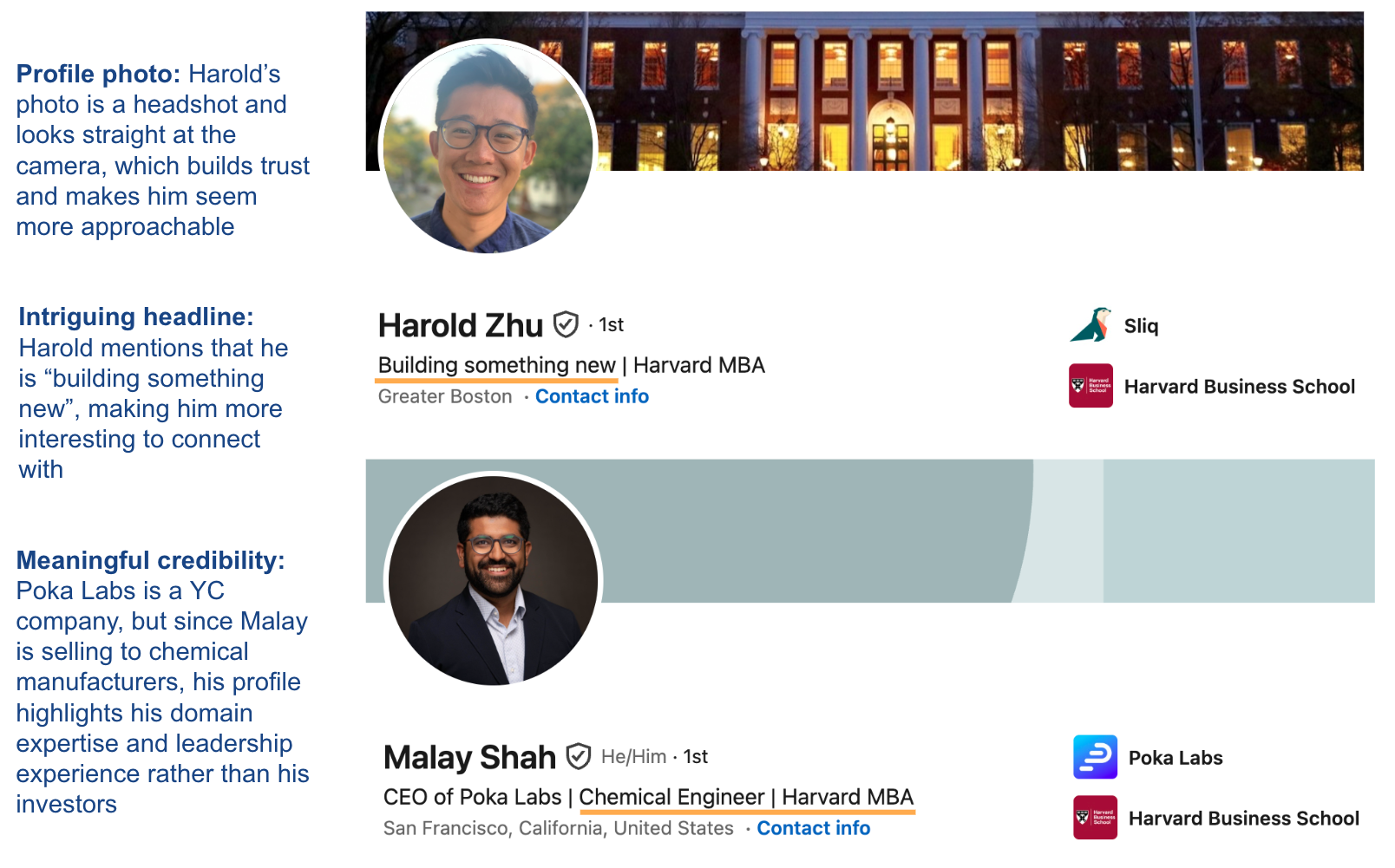
- Photo. It should be mostly your face, approachable, looking at the camera. Skip the shots where you're far away, on stage, talking into a mic, or otherwise hard to make out.
- Headline. Make it clear and a little intriguing — enough to make someone think "this person's worth adding to my network." For example: "Building something new | ex-Google."
- Legitimacy. Use credibility the recipient actually understands. Someone in a legacy industry may not care about YC, Techstars, or your latest round — prior company, school, or industry experience might land much harder.
If your profile is already solid, two more levers: try targeting people with 500+ connections (they tend to be more active and more likely to respond), or step back and ask whether LinkedIn is even the right channel for the people you're selling to. If you're selling to mom-and-pop shops, Instagram or cold calling might be a better option.
Symptom 2: No one responds to me
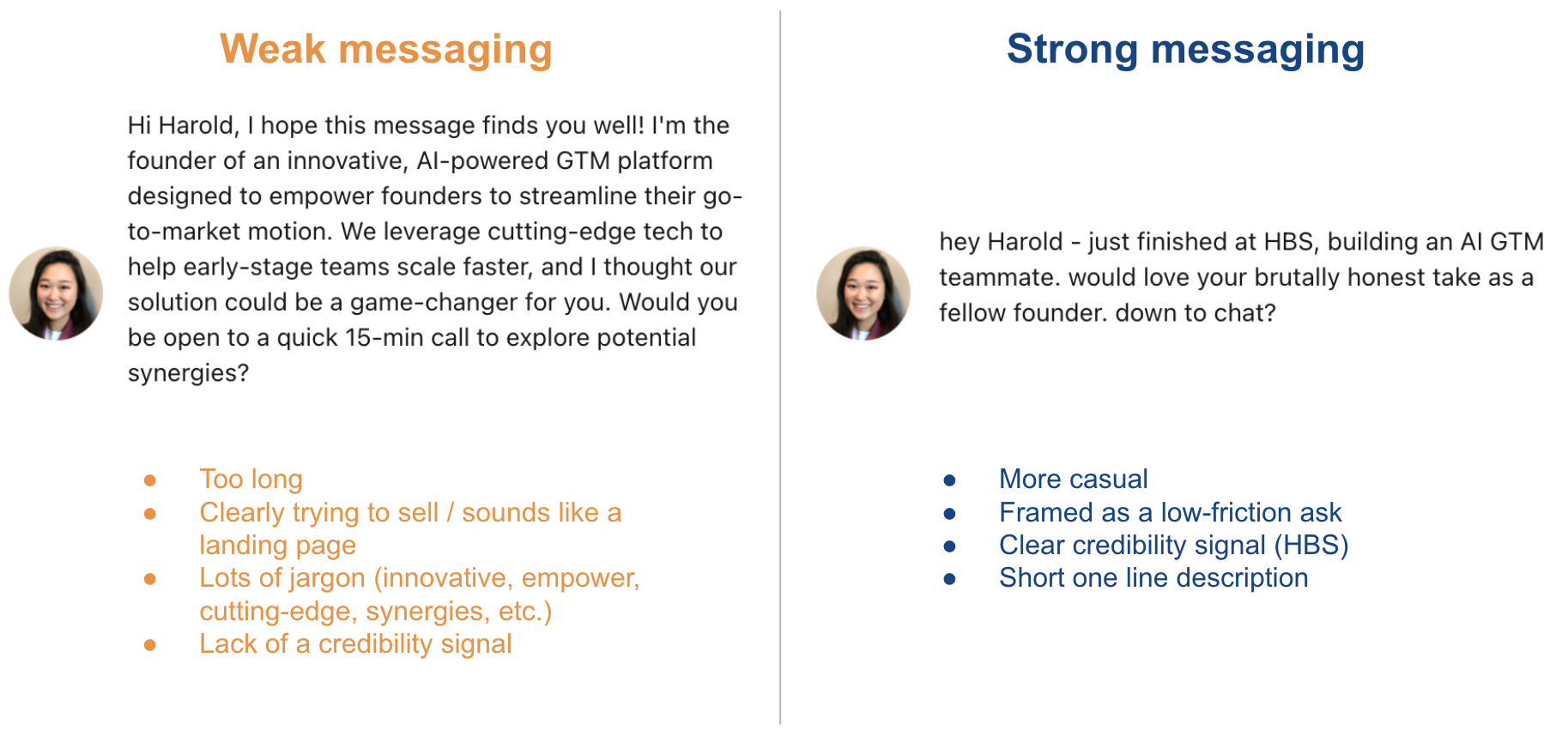
A message that doesn't get replies is usually one of these: too long, too pitchy or product-heavy, too generic, or just missing a single interesting sentence.
Remember what the message is for. It isn't there to explain your whole product — it only needs to be interesting enough to earn a reply. Keep it short, make it about them, and give them one reason to be curious.
Symptom 3: People reply, but they don't book meetings with me
When people respond positively but never end up on your calendar, the cause is usually one of two things: you reply too slowly, or your follow-up system is weak.
Here's the system we'd recommend after a positive reply:
- Reply as fast as you can.
- Follow up in 3 days if they haven't booked.
A solid default reply:
Thanks! Do you have a calendar I can find time on? If not, feel free to use mine: {calendar link}
This works because it hands the prospect control first, while still making it dead easy to book right now.
If they haven't booked after 3 days:
Hey — just following up here. Let me know when works for you to connect.
Finally, track every positive reply in a system or spreadsheet. Build a daily follow-up list and update it.
Symptom 4: I'm booking meetings but not closing
If you're already getting 15+ qualified meetings a week, outbound probably isn't your constraint anymore. You should instead dig deeper into your sales calls. For that, we'd point you to Rob Snyder's B2B Sales Framework.
How to fix your LinkedIn outreach with an AI agent
We know this is a lot to keep in your head, but the good news is you don't have to. We've created a skill file so you can work with an AI agent (our preference is Claude) to improve your sales funnel. Access the skill here.
Or let a Sliq agent run it for you: it reads your funnel stage by stage, tells you which stage is actually failing, audits your profile and message, and runs your fast-reply and 3-day follow-up sequence — so you fix the one stage that's leaking instead of rebuilding the whole funnel.
If you want to run outbound with AI agents, this diagnosis step is usually the first guardrail: identify the weak stage before asking the agent to send more touches.
Delegate this to a Sliq agent ->
Related workflows
- Warm up prospects before outreach with AI if low acceptance or reply rates mean prospects don't recognize you yet
- Personalize your LinkedIn messages with AI if the reply stage is your bottleneck and your message is too generic
- Find warm prospects from LinkedIn post engagement with AI if low acceptance means you need warmer, higher-intent people at the top of the funnel
- LinkedIn outreach best practices
- Browse all GTM plays
Frequently asked questions
Why is my LinkedIn outreach not working?
LinkedIn outreach usually breaks at one specific stage, not everywhere at once. Diagnose by symptom: if people aren't accepting connection requests, the problem is your profile, not your message. If they accept but don't reply, your message is too long, too pitchy, or too generic. If they reply but don't book, you're following up too slowly or have no follow-up system. If you book meetings but don't close, outbound isn't the constraint and you should look at your sales calls instead. Fix the stage that's actually failing rather than rewriting everything.
What's a good LinkedIn connection request acceptance rate?
Aim for an acceptance rate above 30%. A Botdog study of 16,492 invitations found an overall acceptance rate of 37% and recommends holding 30%+ across accounts. Below that, the issue is almost always your profile, because prospects decide based on your profile, not the request itself. Focus on three things: a clear, approachable photo that's mostly your face looking at the camera; a headline that's clear and a little intriguing, like "Building something new | ex-Google"; and credibility the recipient actually understands, which may be a prior company, school, or industry rather than a fund or accelerator. If your profile is already strong, target people with 500+ connections, who tend to be more active and more likely to respond.
How long should a LinkedIn outreach message be?
Keep it short. A LinkedIn message that doesn't get replies is usually too long, too product-heavy, too generic, or missing a single interesting sentence. The message isn't there to explain your whole product — only to be interesting enough to earn a reply. Make it about them, and give them one reason to be curious.
How fast should I follow up after a positive LinkedIn reply?
Reply as fast as you can, then follow up again in three days if they haven't booked. A solid default reply hands the prospect control first while making it easy to book: "Thanks! Do you have a calendar I can find time on? If not, feel free to use mine: {calendar link}." If they haven't booked after three days, send a short nudge: "Hey — just following up here. Let me know when works for you to connect." Track every positive reply in a system or spreadsheet and work a daily follow-up list.
Last updated: August 2026