
Install Sliq Skills in Claude
Step 1: Download the skill files.
Click on the link below and download it (File → Download).
Diagnose LinkedIn Outreach skill
Step 2: Upload them to Claude.
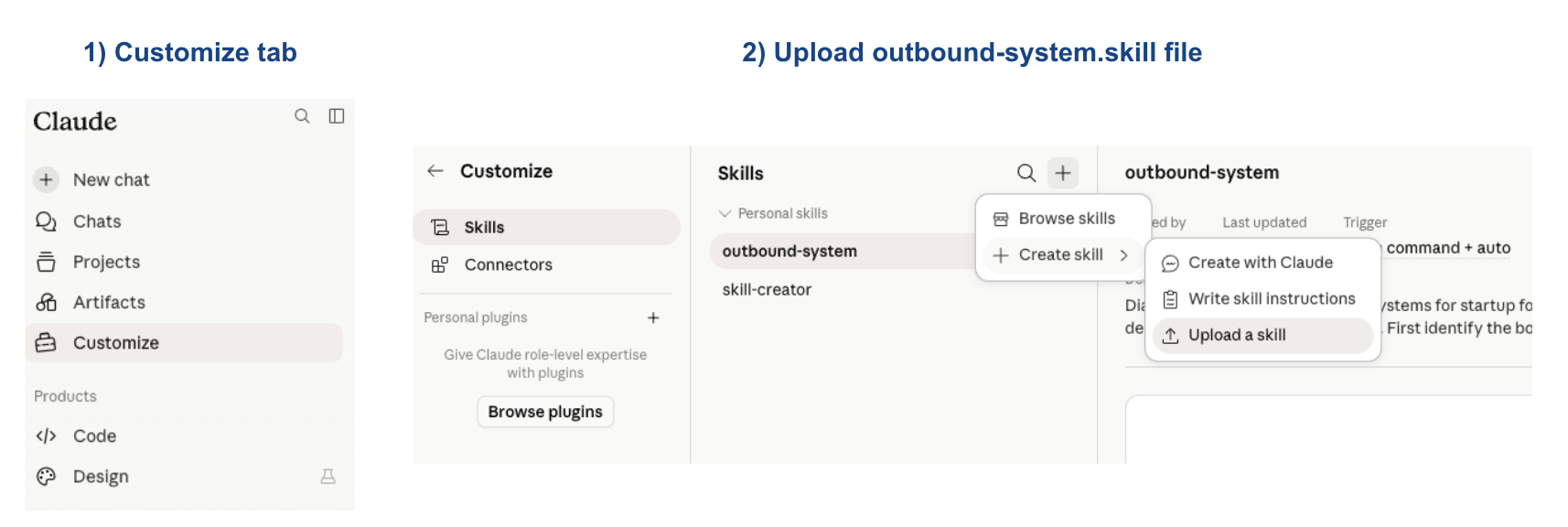
Install it in Claude Chat or the desktop app — go to Customize → Skills → Create skill → Upload a skill → attach the files above.
Step 3: Ask the agent to use the skill.
You can directly reference the skill in the prompt bar by tagging the file name, or Claude will suggest the skill if it's relevant for your prompt.
Step 4: Customize the skill.
The skill file is a living document that can include your business context and personal preferences. As you give Claude feedback, you can also tell it to update the skill file accordingly.
Delegate every GTM task to AI agents
Everything you know you should do, but don't have time for.