
How to Use LinkedIn Social Listening to Win Leads From the Comments
To win leads with LinkedIn social listening, watch the topics your buyers post about, show up early in those conversations, and leave a genuinely useful comment. The people reacting to a post about the problem you solve are, by definition, thinking about that problem, so a sharp comment pulls them to your profile and qualifies them at the same time.
When we look for new leads at Sliq, we often turn to LinkedIn and watch for posts on topics relevant to our industry. When we find people discussing a problem Sliq can solve, we try to show up early in those conversations and leave a genuine comment. A good comment makes us someone worth reaching out to. It gets them to check out our profile and start building a relationship with us.
What is LinkedIn social listening?
LinkedIn social listening is monitoring LinkedIn for posts about the topics your buyers care about, so you can join those conversations while they're still active. It helps founders and sales teams find people who are already talking about the problem they solve, instead of guessing from job titles. Unlike social listening for brand mentions, the goal isn't to track what people say about you; it's to find the threads where a useful comment from you would land.
What topics to watch for on LinkedIn
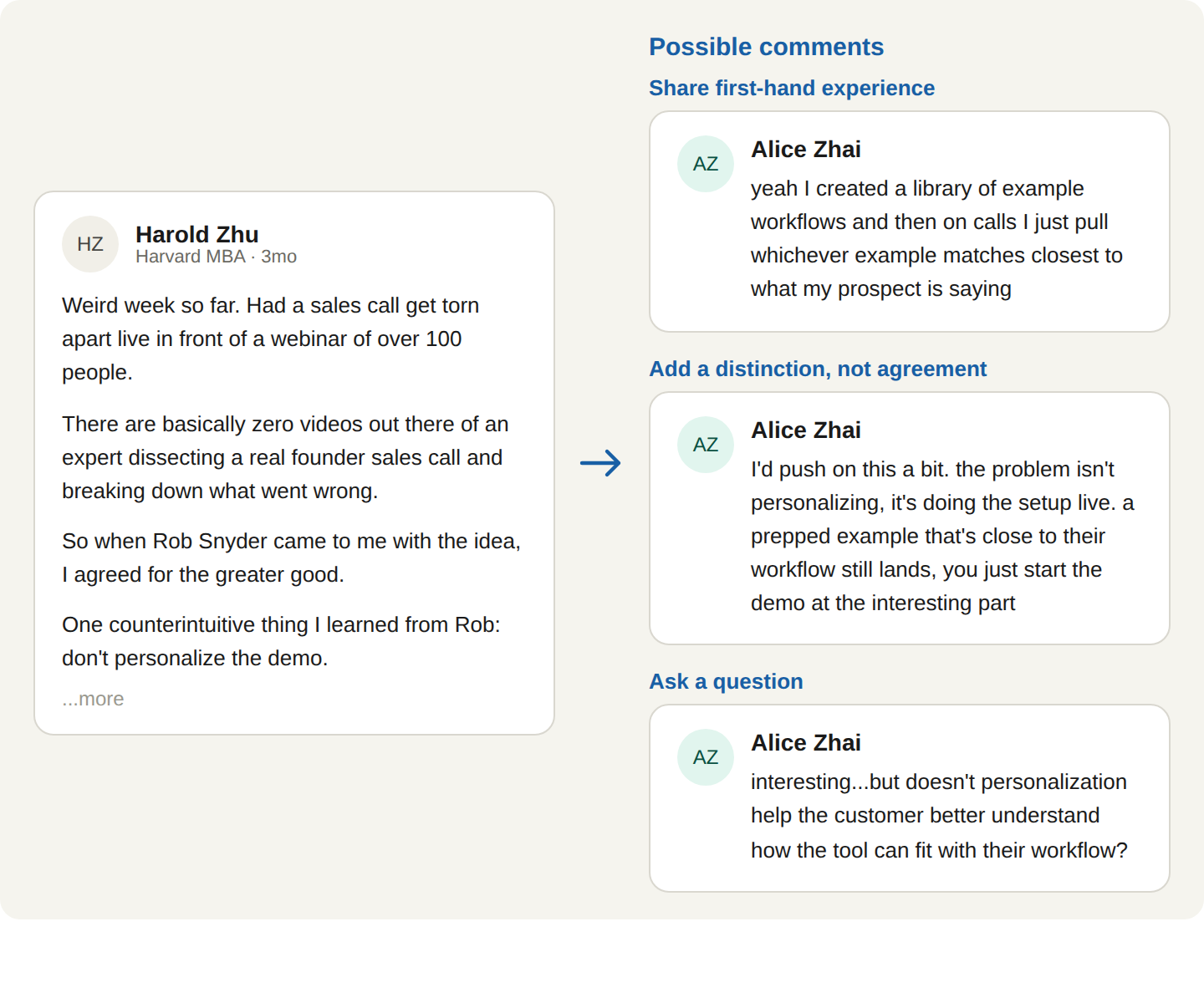
The topics you monitor decide who you end up in front of. Aim for the ones where you can talk about your personal experience or industry expertise. Remember the goal is to write something you would actually say and can provide an interesting take on:
- The problems your product solves: posts where someone is wrestling with the exact thing you fix.
- The subjects you have a real point of view on: where you can add a distinction or a contrarian take, not just agree.
- The trends your buyers are reacting to: the industry shifts they're posting about right now.
Steer away from topics that merely name your category but don't invite a useful reply. The closer the topic sits to a problem you actually solve, the more the people in that thread look like buyers, and the more natural your comment is.
Why responding early matters
A great comment posted too late may risk not getting seen by the poster. LinkedIn pushes posts while they're active, so a thoughtful reply in the first hour or two capitalizes on that reach. Both the poster and the people still reading will notice. If you comment after the thread has 200 replies, you're likely going to be at the bottom of the discussion, somewhere no one scrolls to.
That early-window constraint is the primary reason this is hard to do by hand. In order to ensure you catch the right post in its first few hours, you would have to watch for these topics continuously.
How to fit post commenting into your outreach sequence
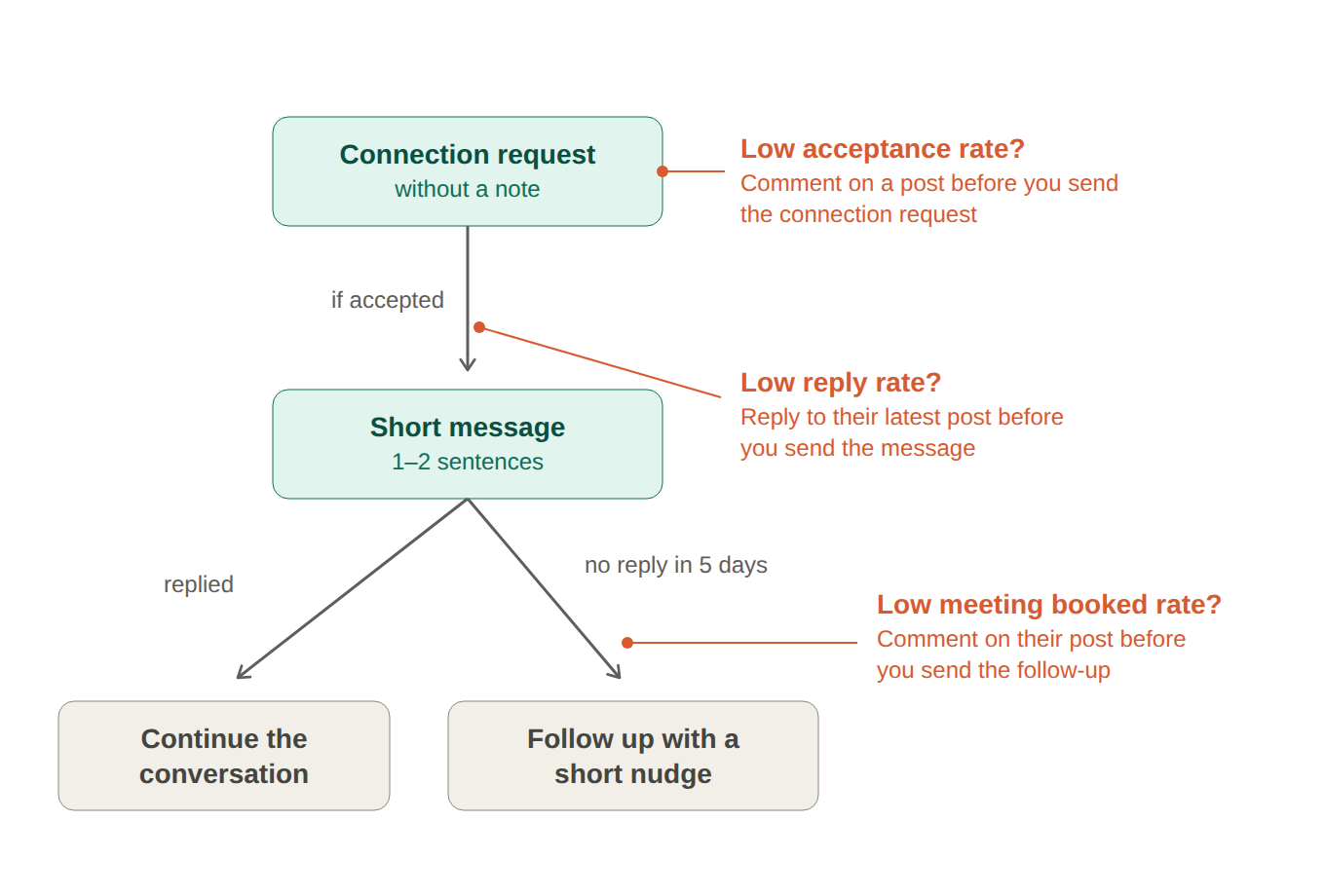
Commenting on posts does not have to happen at the beginning of your outreach sequence. You can incorporate this at any point of your outbound: before sending the connection request, before sending the message, or even while you're waiting for a response.
- If you're seeing low connection request acceptances, initiate the commenting before sending connection requests.
- If you're seeing low message reply rates, reply to their most recent post before sending a message.
- If you're seeing low meeting booked rates, comment on their post before you send a follow up.
This is the same play pointed at a prospect who is already in your sequence. Warming up prospects before LinkedIn outreach covers how to run it there.
How to automate LinkedIn social listening with an AI agent
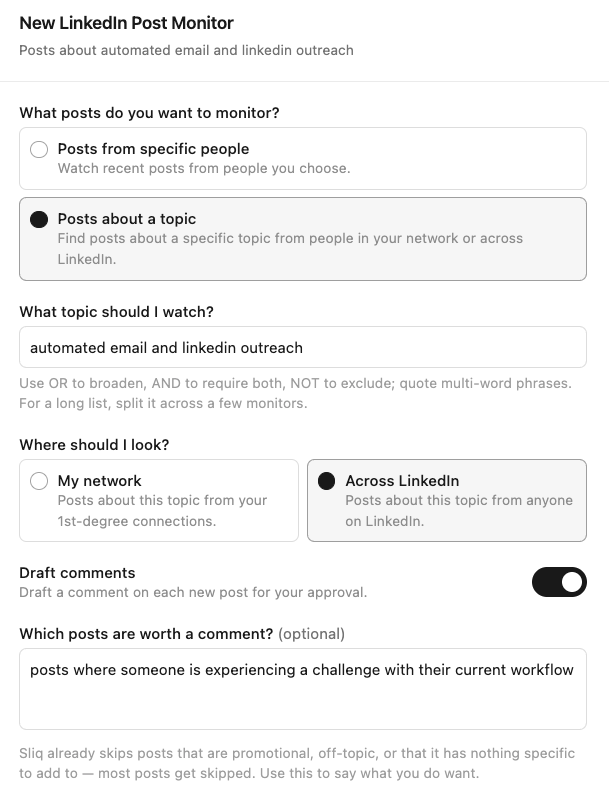
Monitoring LinkedIn for relevant posts and drafting comments while they're still fresh will require your full attention. You can delegate this to Sliq so that it watches the topics you choose, surfaces the posts worth commenting on, and drafts a value-first comment in your voice.
Delegate this to a Sliq agent ->
Related workflows
- Keep your network warm with comments for the same play aimed at people you already know, not topics
- Find customers on Reddit to run the same value-first listening motion on Reddit threads
- Turn engagement on your posts into outreach to capture the people who engage once you're the one posting
- Personalize your LinkedIn messages for when a thread turns into a DM and you want the opener to land
- What is agentic outbound?
- What is signal-based outbound?
- Browse all GTM plays
Frequently asked questions
How do you find leads on LinkedIn by commenting?
Watch the topics your buyers post about and show up in those conversations. Pick the problems you solve, the subjects you have a point of view on, and the trends your buyers care about, then monitor LinkedIn for posts on them and leave a genuinely useful comment. People who read a thoughtful comment on a problem they're actively posting about will check your profile, and that's a warm lead that started itself.
What topics should you monitor on LinkedIn for leads?
Monitor the problems your product solves, the subjects you have a credible point of view on, and the trends your buyers are reacting to. The goal is posts where you can say something useful as a practitioner, not posts that merely mention your category. The closer the topic is to a problem you solve, the more the people in that thread look like buyers.
How do you comment on LinkedIn posts without sounding like a pitch?
Answer the post on its own terms and leave the product out. Add a specific take, a relevant example, or a useful distinction the author and other readers can use even if they never talk to you. Don't drop a link, don't redirect to your tool. Let the quality of the comment send people to your profile. The pitch, if there is one, happens later in a DM, not in the thread.
Why does commenting early on LinkedIn posts matter?
Early comments get seen. LinkedIn surfaces posts while they're active, and a thoughtful comment in the first hour or two rides that reach: the author notices, and so do the other people reading. Comment a day later and you're at the bottom of a long thread nobody scrolls to. The practical constraint is catching the post early, which is why monitoring beats checking the feed when you happen to remember.
Last updated: September 2026