
How to Use Your LinkedIn Network to Find Customers
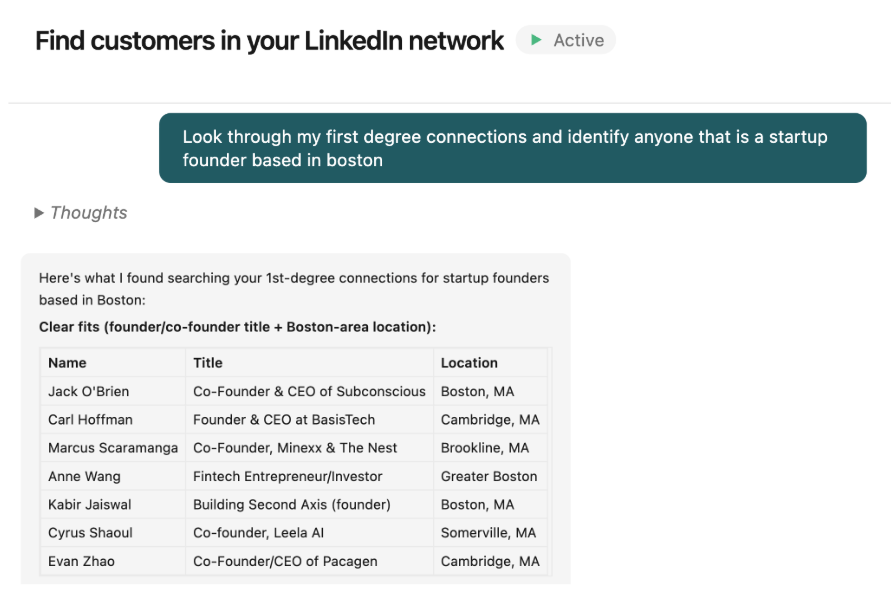
Your LinkedIn network is a valuable resource for identifying prospects. The people you're already connected to and the people one degree away from you are more likely to accept, reply, and take a meeting than a demographic list of strangers. The work is filtering your network down to the people who actually fit your ICP. Start by looking at your 1st-degree connections (you can message them right away), then work outward to 2nd-degree connections.
How to reach out to a 1st-degree connection
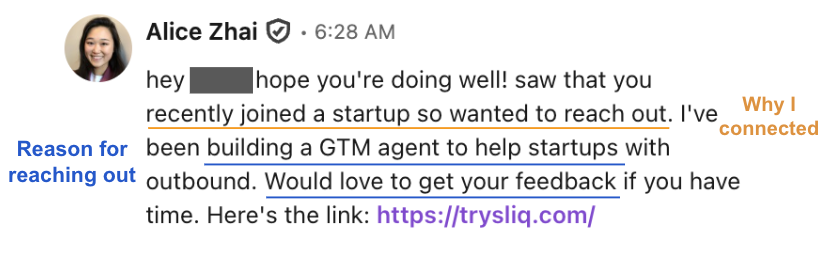
When you reach out to a 1st-degree connection:
- Reference the relationship. How you met, the group you share, or why you connected.
- Keep it short and low-pressure. Two to four sentences, one clear reason you're reaching out.
- Send one follow-up if there's no reply. People miss messages; one nudge is fine.
How to reach out to a 2nd-degree connection
When you reach out to a 2nd-degree connection:
- Send a connection request first — we recommend not attaching a note, since your profile and the visible mutual connection should be enough reason for them to accept.
- Send a short message on accept, then one follow-up. Mention the mutual if you add a note: "Saw you're also connected to [name]." If you want the opener to land even harder, personalize it off something specific — a recent post, a company update — on top of the network warmth you already have.
Note: if you know your mutual connection well, just ask them for an introduction instead.
How to automate finding customers in your network with an AI agent
Tell Sliq to search through your connections — 1st-degree, 2nd-degree, or both — to identify any opportunities. Give it your ICP, and it will flag any potential prospects and add them to an outreach sequence.
Delegate this to a Sliq agent ->
Related workflows
- Find warm intros to your prospects when you have specific people in mind rather than an ICP filter
- Find the warmest path into a target company when you're routing into named accounts instead of filtering by ICP
- Personalize your LinkedIn messages so the opener references something specific, not just the shared history
- Run a simple LinkedIn sequence if you want the standard connection request → message → follow-up shape for cold prospects
- LinkedIn outreach best practices
- Browse all GTM plays
Frequently asked questions
How do you find customers in your LinkedIn network?
Filter your network down to the people who fit your ICP, then reach out using the warmth you already have. Your 1st-degree connections need no connection request — you can message them directly — and your 2nd-degree connections share a mutual, so a request lands softer than a cold one. Define your ICP, pull the matches from whichever ring you want, and reach out.
What is the difference between 1st-degree and 2nd-degree LinkedIn connections?
A 1st-degree connection is someone you're directly connected to — you can message them without a connection request. A 2nd-degree connection is someone one hop away, connected to one of your 1st-degree connections. You're not connected yet, so reaching them starts with a request, but the shared mutual makes it warmer than cold outreach.
What sequence should you use for people in your network?
It depends on the ring. For 1st-degree connections, skip the request and open with a message that references how you know each other, then one follow-up. For 2nd-degree connections, start with a connection request — often no-note, since your profile and the shared mutual do the work — then a short message on accept. Decide the shape before you queue rather than defaulting to a cold sequence.
Last updated: August 2026